PayContext
v1.0.2Chrome extension for SEEK job search
See salary context on SEEK job results
PayContext is a Chrome extension that helps Australian SEEK job seekers compare roles faster by adding salary details, market pay context, and hiring-source signals to supported SEEK job results.
What PayContext adds to SEEK results
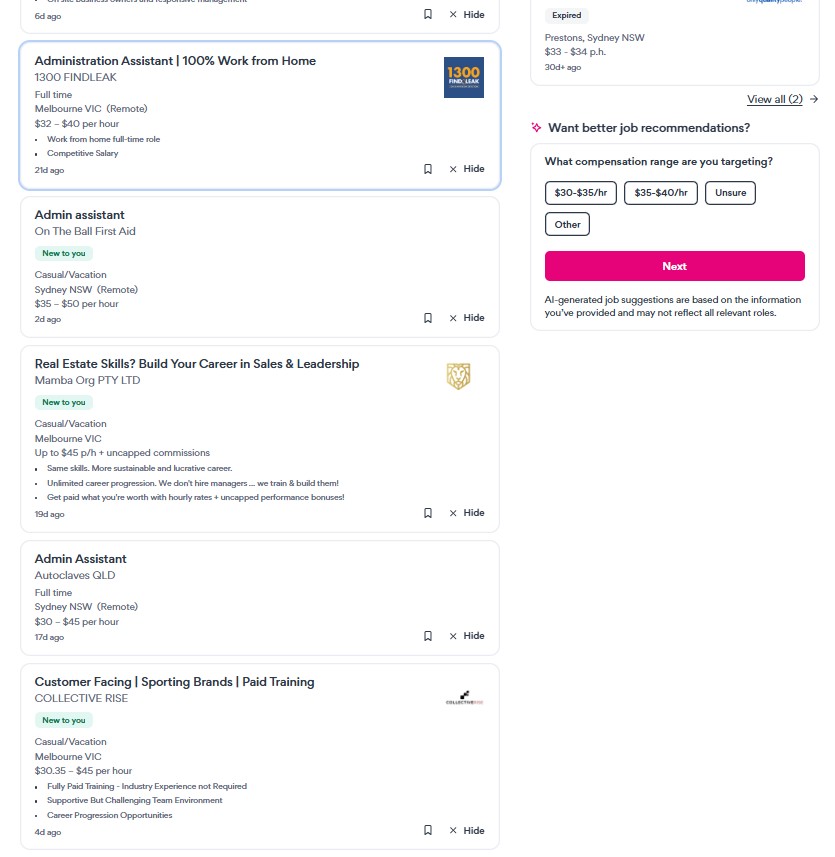
Salary ranges, market context, and hiring-source signals appear directly beside supported SEEK listings.
Without PayContext
With PayContext
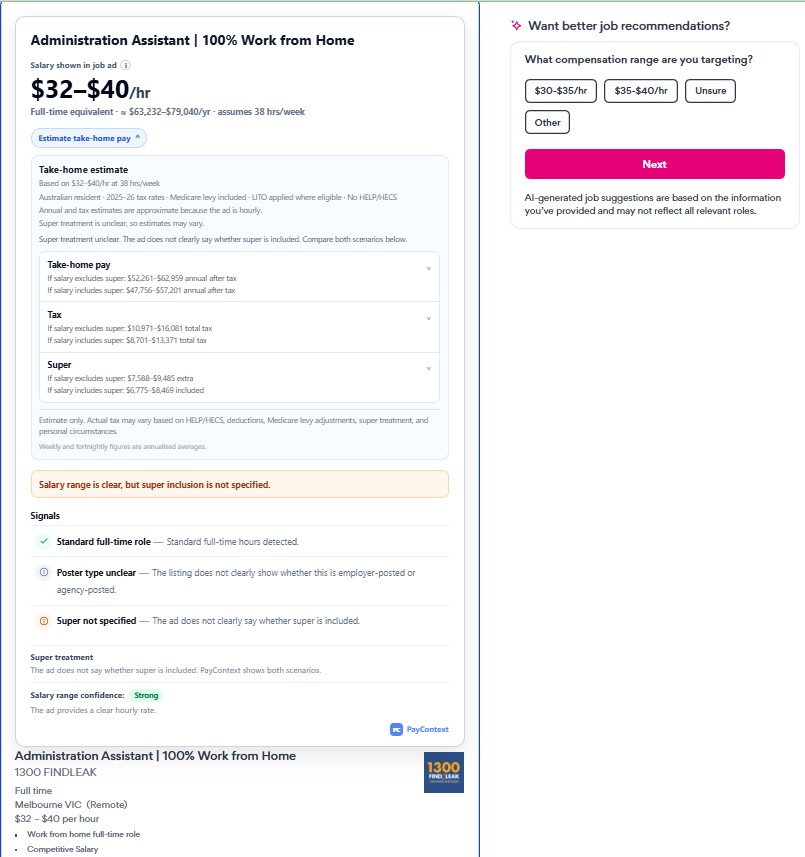
When a job does not disclose salary, PayContext may show market-based guidance from public data sources. Market salary context is general guidance only, not a guaranteed salary offer for any specific role.
Compare jobs with more context
Focus on the salary and hiring signals that make job ads easier to compare.
Spot jobs with visible pay faster
Surface salary ranges or hourly rates from SEEK listings when the advertiser has provided them.
Understand hidden-pay listings
For listings without disclosed pay, PayContext can show market context from public data sources.
Identify recruiter vs employer signals
See whether a role appears to be posted by a recruiter or directly by an employer.
Estimate take-home pay
Open a compact take-home pay estimate from supported salary signals, including super treatment and hourly scenarios.
How it works
PayContext adds a lightweight context layer while you browse supported SEEK search result pages.
Open SEEK results
PayContext is designed for supported SEEK search result pages in your browser.
Read visible listing details
The extension uses listing information already shown on the SEEK page, such as title, pay wording, and visible job details.
Add context in your browser
PayContext adds salary, market, and hiring-source signals as a lightweight visual layer.
Privacy-first by design
PayContext runs locally in your browser. It does not send your personal SEEK browsing activity to external servers.
- Runs on supported SEEK pages in your browser.
- No personal SEEK browsing activity is sent to external servers by the extension.
- Uses local storage for settings and temporary cached job detail data.
- No remote code.
Frequently asked questions
Where does the salary data come from?
PayContext uses two sources. If a salary is shown in the SEEK listing, PayContext displays that advertiser-provided information. If no salary is disclosed, PayContext may show market salary guidance based on publicly available data sources such as ABS and other public salary references.
How accurate is the salary information?
Advertiser-provided salaries come directly from the listing. Market salary ranges are benchmarks intended to help with comparison and should not be treated as a guaranteed offer for a specific role.
Is salary guidance guaranteed?
No. Market salary context is general guidance only. It is not a guaranteed salary offer, payroll figure, or official tax result for any specific role.
Does PayContext estimate or predict salaries?
PayContext does not generate a guaranteed salary for an individual listing. It either shows salary information disclosed in the listing or adds market context derived from aggregated public data.
Which SEEK pages are supported?
PayContext is designed for supported SEEK search result pages. Some pages, regions, experiments, or listing formats may not show every signal.
Does PayContext send my job browsing activity to external servers?
The browser extension runs locally and does not send your personal SEEK browsing activity to external servers. It uses local browser storage for settings and temporary cached job detail data.
Will this affect how SEEK works?
No. PayContext does not replace SEEK content or interfere with normal browsing. It adds supplementary information to the page so you can review listings more efficiently.
Is it safe to use?
PayContext runs locally in your browser. It does not send your personal information or job browsing activity to external servers, and it only uses the minimum permissions needed for its core functionality.
Why does Chrome show "This extension is not trusted by Enhanced Safe Browsing"?
You may see this message because Chrome's Enhanced Safe Browsing applies an extra trust check to newer extensions and newer developer accounts. It does not mean PayContext has been marked as unsafe, and it does not mean the extension failed Chrome Web Store review.
PayContext is built with a privacy-first design: it only requests access to supported SEEK pages, does not use remote code, does not collect your personal information, and does not send your job browsing activity to external servers. The extension runs locally in your browser to add salary context and hiring-source signals while you browse SEEK.
If you are comfortable with the permissions shown by Chrome, you can continue installing PayContext. As the extension builds more usage and trust history, this warning may stop appearing for users with Enhanced Safe Browsing enabled.
Ready to compare SEEK job listings faster?
Install PayContext and see salary context directly on supported SEEK search results.
Install PayContext